device_info_plus
获取设信息
pub 地址:https://pub.dev/packages/device_info_plus
安装
dependencies:
  device_info_plus: ^11.5.0
使用
import 'package:flutter/cupertino.dart';
import 'package:device_info_plus/device_info_plus.dart';

void main() => runApp(const MyApp());

class MyApp extends StatelessWidget {
  const MyApp({super.key});
  _getDeviceInfo() async {
    final deviceInfoPlugin = DeviceInfoPlugin();
    final deviceInfo = await deviceInfoPlugin.deviceInfo;
    final allInfo = deviceInfo.data;
    print(allInfo);
    print(allInfo['identifierForVendor']);
  }

  @override
  Widget build(BuildContext context) {
    _getDeviceInfo();
    return const CupertinoApp(
      title: 'Cupertino App',
      home: CupertinoPageScaffold(
        navigationBar: CupertinoNavigationBar(
          middle: Text('Cupertino App Bar'),
        ),
        child: Center(child: Text('Hello World')),
      ),
    );
  }
}
connectivity_plus
获取网络连接状态和类型、连接网络监听 pub 地址:https://pub.dev/packages/connectivity_plus
安装
dependencies:
  connectivity_plus: ^6.1.5
使用
import 'package:flutter/material.dart';
import 'package:connectivity_plus/connectivity_plus.dart';
import 'dart:async';

void main() => runApp(const MaterialApp(home: NetWorkPage()));

class NetWorkPage extends StatefulWidget {
  const NetWorkPage({super.key});

  @override
  State<NetWorkPage> createState() => _NetWorkPageState();
}

class _NetWorkPageState extends State<NetWorkPage> {
  StreamSubscription<List<ConnectivityResult>>? subscription;
  String status = "未知";

  @override
  void initState() {
    super.initState();
    subscription = Connectivity().onConnectivityChanged.listen((
      List<ConnectivityResult> results,
    ) {
    print(results);
      // results 可能包含多个值,我们取第一个来判断
      final result = results.isNotEmpty
          ? results.first
          : ConnectivityResult.none;

      setState(() {
        switch (result) {
          case ConnectivityResult.wifi:
            status = "wifi 网络";
            break;
          case ConnectivityResult.ethernet:
            status = "以太网网络";
            break;
          case ConnectivityResult.mobile:
            status = "手机网络";
            break;
          case ConnectivityResult.vpn:
            status = "vpn 网络";
            break;
          case ConnectivityResult.none:
            status = "没有网络";
            break;
          default:
            status = "其它网络";
        }
      });
    });
  }

  @override
  void dispose() {
    subscription?.cancel();
    super.dispose();
  }

  @override
  Widget build(BuildContext context) {
    return Scaffold(
      appBar: AppBar(title: const Text('网络监测')),
      body: Center(child: Text("网络状态:$status")),
    );
  }
}
url_launcher
配置打开 URL、拨打电话 、发送短信 、打开外部应用、打开高德地图
pub 地址:https://pub.dev/packages/url_launcher
安装
dependencies:
  url_launcher: ^6.3.2
打开浏览器访问页面
import 'package:flutter/material.dart';
import 'package:url_launcher/url_launcher.dart';

void main() => runApp(const MaterialApp(home: UrlLauncherPage()));

class UrlLauncherPage extends StatefulWidget {
  const UrlLauncherPage({super.key});

  @override
  State<UrlLauncherPage> createState() => _UrlLauncherPageState();
}

class _UrlLauncherPageState extends State<UrlLauncherPage> {
  @override
  Widget build(BuildContext context) {
    return Scaffold(
      appBar: AppBar(title: const Text('url_launcher')),
      body: Center(
        child: Column(
          mainAxisAlignment: MainAxisAlignment.center,
          children: [
            ElevatedButton(
              onPressed: () async {
                final Uri _url = Uri.parse('https://ronhai.com');
                if (await canLaunchUrl(_url)) {
                  await launchUrl(_url);
                } else {
                  print('没有办法打开这个地址');
                }
              },
              child: const Text('打开浏览器'),
            ),
          ],
        ),
      ),
    );
  }
}
安卓配置
修改:android\app\src\main\AndroidManifest.xml
<queries>
    <intent>
        <action android:name="android.intent.action.PROCESS_TEXT"/>
        <data android:mimeType="text/plain"/>
    </intent>
    <intent>
        <action android:name="android.intent.action.VIEW" />
        <data android:scheme="sms" />
    </intent>
    <!-- If your app checks for call support -->
    <intent>
        <action android:name="android.intent.action.VIEW" />
        <data android:scheme="tel" />
    </intent>
    <!-- If your application checks for inAppBrowserView launch mode support -->
    <intent>
        <action android:name="android.support.customtabs.action.CustomTabsService" />
    </intent>
</queries>
<uses-permission android:name="android.permission.QUERY_ALL_PACKAGES"/>
ios 配置
拨打电话、发短信不配置也可以,如果不行在配置
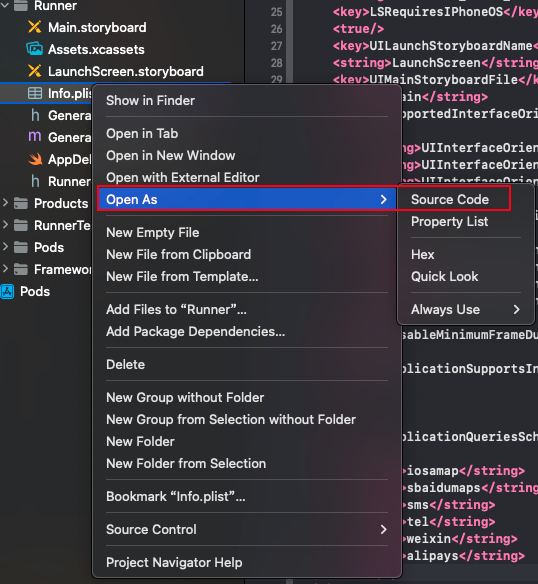
打开外部应用、高德地图导航 Info.plist,在 xcode 中增加以下代码后重新运行 flutter 项目.
<key>LSApplicationQueriesSchemes</key>
<array>
  <string>iosamap</string>
  <string>sbaidumaps</string>
  <string>sms</string>
  <string>tel</string>
  <string>weixin</string>
  <string>alipays</string>
</array>
可以打开源码方式增加,如下图:
增加到
发送短信
ElevatedButton(
    child: const Text('发送短信'),
    onPressed: () async {
      final Uri tel = Uri.parse('sms:10086');
      if (await canLaunchUrl(tel)) {
        await launchUrl(tel);
      } else {
        print('没有办法发送短信$tel');
      }
    },
  ),
拨打电话
ElevatedButton(
    child: const Text('拨打电话'),
    onPressed: () async {
      final Uri tel = Uri.parse('tel:10086');
      if (await canLaunchUrl(tel)) {
        await launchUrl(tel);
      } else {
        print('没有办法拨打电话$tel');
      }
    },
  ),
打开外部 App
 ElevatedButton(
  child: const Text('打开支付宝'),
  onPressed: () async {
    final Uri alipays = Uri.parse('alipays://');
    if (await canLaunchUrl(alipays)) {
      await launchUrl(alipays);
    } else {
      print('没有办法打开支付宝');
    }
  },
),
const SizedBox(
  height: 30,
),
ElevatedButton(
  child: const Text('打开微信'),
  onPressed: () async {
    final Uri wechat = Uri.parse('weixin://');
    if (await canLaunchUrl(wechat)) {
      await launchUrl(wechat);
    } else {
      print('没有办法打开支付宝');
    }
  },
),
高德地图 App
高德官网导航地址:https://lbs.amap.com/api/amap-mobile/guide/android/navigation
坐标吸取器:https://lbs.amap.com/tools/picker
ElevatedButton(
  child: const Text('打开高德地图'),
  onPressed: () async {
    String title = '洪崖洞';
    String longitude = "106.575329";
    String latitude = "29.557253";
    Uri uri = Uri.parse(
        '${Platform.isAndroid ? 'android' : 'ios'}amap://navi?sourceApplication=amap&poiname=$title&lat=$latitude&lon=$longitude&dev=0&style=2pkg=com.autonavi.minimap');
    if (await canLaunchUrl(uri)) {
      await launchUrl(uri);
    } else {
      print('没有办法打开高德地图');
    }
  },
),
常见 App 的 scheme
电商
taobao : 淘宝
tmall : 天猫
jdlogin : 京东
pinduoduo : 拼多多
kaola : 网易考拉
yanxuan : 网易严选
vipshop : 唯品会
suning : 苏宁
mishopv1 : 小米商城
wireless1688 : 阿里巴巴

社交、社区
weibo : 微博
zhihu : 知乎
xhsdiscover : 小红书
momochat : 陌陌
blued : blued
mqzone : QQ空间
mqq : QQ
tantanapp : 探探
huputiyu : 虎扑
com.baidu.tieba : 贴吧
tianya : 天涯社区
douban : 豆瓣
jike : 即刻

短视频
snssdk1128 : 抖音
snssdk1112 : 火山
snssdk32 : 西瓜视频
gifshow : 快手

视频/直播
tenvideo : 腾讯视频
youku : 优酷
bilibili : B站
imgotv : 芒果TV
qiyi-iphone : 爱奇艺
hanju : 韩剧TV
douyutv : 斗鱼
yykiwi : 虎牙

图片处理
mtxx.open : 美图秀秀
faceu : faceu国内
ulike : 轻颜国内

资讯
snssdk141 : 今日头条
newsapp : 网易新闻
qqnews : 腾讯新闻
iting : 喜马拉雅
weread : 微信读书
jianshu : 简书
igetApp : 得到
kuaikan : 快看漫画

财经
sinanews : 新浪财经
amihexin : 同花顺炒股

音乐
orpheus : 网易云音乐
qqmusic : qq音乐
kugouURL : 酷狗
qmkege : 全民K歌
changba : 唱吧

工具
iosamap : 高德地图
baidumap : 百度地图
baiduyun : 百度网盘
rm434209233MojiWeather : 墨迹天气

办公
wxwork : 企业微信
dingtalk : 钉钉

生活
imeituan : 美团
dianping : 点评
cainiao : 菜鸟裹裹
wbmain : 58同城
mihome : 米家

美食佳饮
xcfapp : 下厨房
sbuxcn : 星巴克中国
meituanwaimai : 美团外卖

运动健康
fb370547106731052 : 小米运动
meetyou.linggan : 美柚
babytree : 宝宝树
keep : keep

旅行
CtripWireless : 携程
diditaxi : 滴滴
taobaotravel : 飞猪
travelguide : 马蜂窝

游戏
tencent1104466820 : 王者荣耀
tencent100689805 : 天天爱消除
tencent382 : QQ斗地主
常用地图打开组件
设置一个地图的组件,可以调用相应的地图软件,可以更换自定义的图标和提示框
map.dart
import 'dart:io';
import 'package:flutter/material.dart';
import 'package:url_launcher/url_launcher.dart';

class MapLauncher {
  /// 打开地图选择弹窗
  static void showMapOptions({
    required BuildContext context,
    required double lat,
    required double lon,
    required String name,
  }) {
    showModalBottomSheet(
      context: context,
      builder: (ctx) {
        return SafeArea(
          child: Wrap(
            children: [
              ListTile(
                leading: const Icon(Icons.map),
                title: const Text("百度地图"),
                onTap: () {
                  Navigator.pop(ctx);
                  _openBaiduMap(context, lat, lon, name);
                },
              ),
              ListTile(
                leading: const Icon(Icons.map),
                title: const Text("高德地图"),
                onTap: () {
                  Navigator.pop(ctx);
                  _openAMap(context, lat, lon, name);
                },
              ),
              if (Platform.isIOS)
                ListTile(
                  leading: const Icon(Icons.map),
                  title: const Text("苹果地图"),
                  onTap: () {
                    Navigator.pop(ctx);
                    _openAppleMap(context, lat, lon, name);
                  },
                ),
            ],
          ),
        );
      },
    );
  }

  /// 弹出提示
  static void _showAlert(BuildContext context, String message) {
    showDialog(
      context: context,
      builder: (ctx) => AlertDialog(
        title: const Text("提示"),
        content: Text(message),
        actions: [
          TextButton(
            onPressed: () => Navigator.pop(ctx),
            child: const Text("确定"),
          ),
        ],
      ),
    );
  }

  /// 百度地图导航
  static Future<void> _openBaiduMap(
    BuildContext context,
    double lat,
    double lon,
    String name,
  ) async {
    final url = Uri.parse(
      "baidumap://map/direction?destination=latlng:$lat,$lon|name:$name&mode=driving",
    );
    if (await canLaunchUrl(url)) {
      await launchUrl(url, mode: LaunchMode.externalApplication);
    } else {
      _showAlert(context, "未安装百度地图");
    }
  }

  /// 高德地图导航
  static Future<void> _openAMap(
    BuildContext context,
    double lat,
    double lon,
    String name,
  ) async {
    final url = Uri.parse(
      "amapuri://route/plan/?dlat=$lat&dlon=$lon&dname=$name&dev=0&t=0",
    );
    if (await canLaunchUrl(url)) {
      await launchUrl(url, mode: LaunchMode.externalApplication);
    } else {
      _showAlert(context, "未安装高德地图");
    }
  }

  /// 苹果地图导航 (仅 iOS)
  static Future<void> _openAppleMap(
    BuildContext context,
    double lat,
    double lon,
    String name,
  ) async {
    final url = Uri.parse("http://maps.apple.com/?daddr=$lat,$lon&dirflg=d");

    if (await canLaunchUrl(url)) {
      final ok = await launchUrl(url, mode: LaunchMode.externalApplication);
      if (!ok) {
        _showAlert(context, "无法打开苹果地图");
      }
    } else {
      _showAlert(context, "未安装苹果地图");
    }
  }
}
IOS 配置才能使用,在 os/Runner/Info.plist 里添加 允许的 Scheme,配置了重新打包运行
<key>LSApplicationQueriesSchemes</key>
<array>
  <string>baidumap</string>
  <string>iosamap</string>
  <string>amapuri</string>
</array>
使用组件
ElevatedButton(
    onPressed: () {
    MapLauncher.showMapOptions(
        context: context,
        lat: 39.915, // 天安门
        lon: 116.404,
        name: "天安门",
    );
    },
    child: const Text("选择地图导航"),
)